# 内置角色
MongoDB通过基于角色的授权 (opens new window)授予对数据和命令的访问权,并提供内置的角色,这些角色提供数据库系统中通常需要的不同级别的访问权。MongoDB也提供了用户自定义角色 (opens new window)功能。
# 思维导图
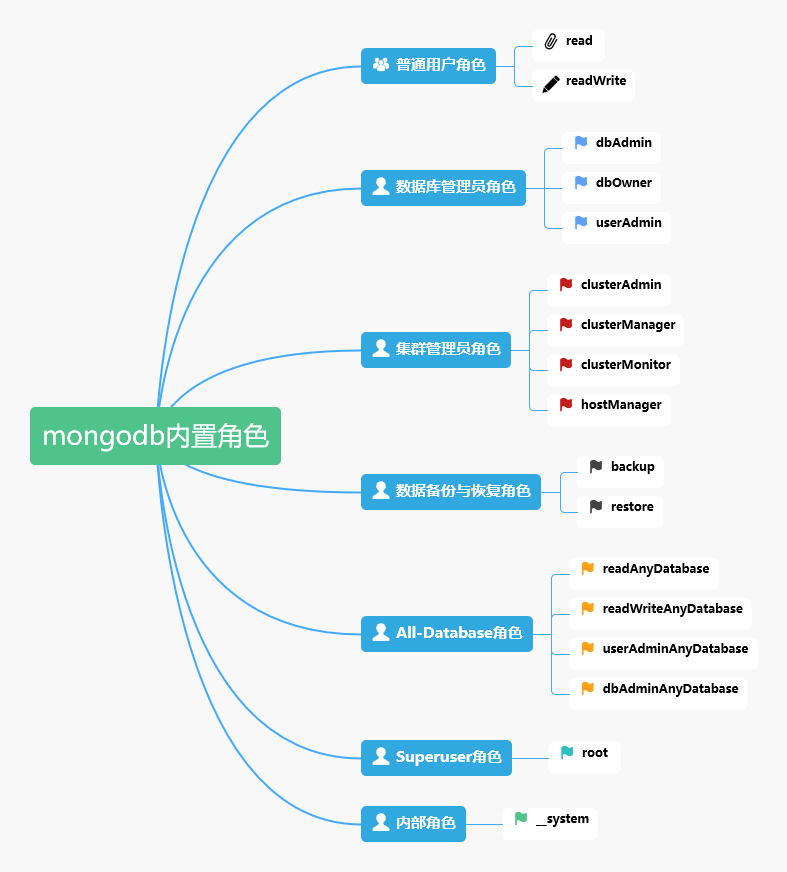
# 普通用户角色
# read
提供读取所有非系统表和system.js表上的数据的能力。
read角色通过以下操作提供读访问:
- changeStream (opens new window)
- collStats (opens new window)
- dbHash (opens new window)
- dbStats (opens new window)
- find (opens new window)
- killCursors (opens new window)
- listIndexes (opens new window)
- listCollections (opens new window)
# readWrite
readWrite角色包含了read角色所有的权限,同时增加了对所有非系统表和system.js表的修改权限。
readWrite角色提供了以下的操作:
- changeStream (opens new window)
- collStats (opens new window)
- convertToCapped (opens new window)
- createCollection (opens new window)
- dbHash (opens new window)
- dbStats (opens new window)
- dropCollection (opens new window)
- createIndex (opens new window)
- dropIndex (opens new window)
- find (opens new window)
- insert (opens new window)
- killCursors (opens new window)
- listIndexes (opens new window)
- listCollections (opens new window)
- remove (opens new window)
- renameCollectionSameDB (opens new window)
- update (opens new window)
# 数据库管理员角色
数据库管理员角色有dbAdmin, dbOwner, userAdmin三种。
# dbAdmin
此角色提供执行管理任务的能力,例如与模式相关的任务、索引和收集统计信息。
该角色提供以下权限:
system.profile (opens new window)
- changeStream (opens new window)
- collStats (opens new window)
- convertToCapped (opens new window)
- createCollection (opens new window)
- dbHash (opens new window)
- dbStats (opens new window)
- dropCollection (opens new window)
- find (opens new window)
- killCursors (opens new window)
- listCollections (opens new window)
- listIndexes (opens new window)
- planCacheRead (opens new window)
所有非系统的表
- bypassDocumentValidation (opens new window)
- collMod (opens new window)
- collStats (opens new window)
- compact (opens new window)
- convertToCapped (opens new window)
- createCollection (opens new window)
- createIndex (opens new window)
- dbStats (opens new window)
- dropCollection (opens new window)
- dropDatabase (opens new window)
- dropIndex (opens new window)
- enableProfiler (opens new window)
- listCollections (opens new window)
- listIndexes (opens new window)
- planCacheIndexFilter (opens new window)
- planCacheRead (opens new window)
- planCacheWrite (opens new window)
- reIndex (opens new window)
- renameCollectionSameDB (opens new window)
- storageDetails (opens new window)
- validate (opens new window)
- dbAdmin角色并不包含所有的read权限,如find。
# dbOwner
数据库所有者可以对数据库执行任何管理操作。此角色包含了readWrite, dbAdmin 和 userAdmin角色的所有权限。
# userAdmin
提供了在当前数据库上创建和修改角色与用户的能力。由于userAdmin角色允许用户向任何用户(包括自己)授予任何权限,因此该角色还间接提供了超级用户对数据库的访问(如果作用域为admin数据库),或者对集群的访问。
userAdmin角色提供以下操作:
- changeCustomData (opens new window)
- changePassword (opens new window)
- createRole (opens new window)
- createUser (opens new window)
- dropRole (opens new window)
- dropUser (opens new window)
- grantRole (opens new window)
- revokeRole (opens new window)
- setAuthenticationRestriction (opens new window)
- viewRole (opens new window)
- viewUser (opens new window)
注意: 具有此角色的用户可以为自己分配对该数据库的任何权限。在admin数据库上授予userAdmin角色具有进一步的安全影响,因为这间接提供了对集群的超级用户访问。在admin范围内,具有userAdmin角色的用户可以授予集群范围的角色或权限,包括userAdminAnyDatabase。
# 集群管理员角色
admin数据库包括以下角色,用于管理整个系统,而不仅仅是单个数据库。这些角色包括但不限于复制集和分片集群管理功能。
# clusterAdmin
提供了最大的集群管理访问权限。该角色结合了clusterManager、clusterMonitor和hostManager角色所具有的权限。此外,该角色还提供dropDatabase操作权限。
# clusterManager
提供了对集群的管理和监控操作权限。具有此角色的用户可以访问config数据库和local数据库。
- cluster (opens new window)
- addShard (opens new window)
- appendOplogNote (opens new window)
- applicationMessage (opens new window)
- cleanupOrphaned (opens new window)
- flushRouterConfig (opens new window)
- getDefaultRWConcern(New in version 4.4) (opens new window)
- listSessions(New in version 3.6) (opens new window)
- listShards (opens new window)
- removeShard (opens new window)
- replSetConfigure (opens new window)
- replSetGetConfig (opens new window)
- replSetGetStatus (opens new window)
- replSetStateChange (opens new window)
- resync (opens new window)
- setDefaultRWConcern(New in version 4.4) (opens new window)
- setFeatureCompatibilityVersion (opens new window)
- setFreeMonitoring (opens new window)
- 所有数据库
clusterManager为config和local数据库提供了额外的权限。
在config数据库中,提供了以下操作权限:
- config数据库上所有非系统的表
- collStats (opens new window)
- dbHash (opens new window)
- dbStats (opens new window)
- enableSharding (opens new window)
- find (opens new window)
- insert (opens new window)
- killCursors (opens new window)
- listCollections (opens new window)
- listIndexes (opens new window)
- moveChunk (opens new window)
- planCacheRead (opens new window)
- remove (opens new window)
- splitVector (opens new window)
- update (opens new window)
- system.js (opens new window)
在local数据库中,提供了以下操作权限:
- local数据库上所有非系统的表
- system.replset (opens new window)表
# clusterMonitor
为监控工具提供只读访问权限。
允许在整个集群上执行以下操作:
- checkFreeMonitoringStatus(New in version 4.0) (opens new window)
- connPoolStats (opens new window)
- getCmdLineOpts (opens new window)
- getDefaultRWConcern(New in version 4.4) (opens new window)
- getLog (opens new window)
- getParameter (opens new window)
- getShardMap (opens new window)
- hostInfo (opens new window)
- inprog (opens new window)
- listDatabases (opens new window)
- listSessions(New in version 3.6) (opens new window)
- listShards (opens new window)
- netstat (opens new window)
- replSetGetConfig (opens new window)
- replSetGetStatus (opens new window)
- serverStatus (opens new window)
- setFreeMonitoring(New in version 4.0) (opens new window)
- shardingState (opens new window)
- top (opens new window)
允许对集群中的所有数据库执行以下操作:
- collStats (opens new window)
- dbStats (opens new window)
- getShardVersion (opens new window)
- indexStats (opens new window)
- useUUID(New in version 3.6) (opens new window)
允许对集群的所有system.profile表执行find操作。
在config数据库中,允许执行以下操作:
- config数据库上所有非系统的表
- collStats (opens new window)
- dbHash (opens new window)
- dbStats (opens new window)
- find (opens new window)
- getShardVersion (opens new window)
- indexStats (opens new window)
- killCursors (opens new window)
- listCollections (opens new window)
- listIndexes (opens new window)
- planCacheRead (opens new window)
- system.js (opens new window)表
在local数据库中,提供了以下操作权限:
- local数据库上的所有表
- collStats (opens new window)
- dbHash (opens new window)
- dbStats (opens new window)
- find (opens new window)
- getShardVersion (opens new window)
- indexStats (opens new window)
- killCursors (opens new window)
- listCollections (opens new window)
- listIndexes (opens new window)
- planCacheRead (opens new window)
- system.js (opens new window)表
- system.replset (opens new window), system.profile (opens new window)
# hostManager
提供了监控和管理服务器的能力。
在整个集群上,提供以下操作权限:
- applicationMessage (opens new window)
- closeAllDatabases (opens new window)
- connPoolSync (opens new window)
- flushRouterConfig (opens new window)
- fsync (opens new window)
- invalidateUserCache (opens new window)
- killAnyCursor(New in version 4.0) (opens new window)
- killAnySession(New in version 3.6) (opens new window)
- killop (opens new window)
- logRotate (opens new window)
- oidReset (opens new window)
- resync (opens new window)
- rotateCertificates(New in version 5.0) (opens new window)
- setParameter (opens new window)
- shutdown (opens new window)
- touch (opens new window)
- unlock (opens new window)
从4.4版开始,hostManager不再为集群提供cpuProfiler (opens new window)权限操作。
在集群的所有数据库上,提供killCursors (opens new window)操作权限。
# backup与restore角色
admin数据库提供backup和restore角色用于备份和恢复数据。
# backup
提供了备份数据所需的最小权限。该角色提供足够的权限使用MongoDB Cloud Manager备份代理、Ops Manager备份代理,或者使用 mongodump备份整个mongod实例。
为admin数据库的mms.backup表和config数据库的settings表提供insert (opens new window)和update (opens new window)操作权限。
在anyResource (opens new window),提供以下操作权限:
在整个集群 (opens new window),提供以下操作权限:
- appendOplogNote (opens new window)
- getParameter (opens new window)
- listDatabases (opens new window)
- serverStatus(Starting in MongoDB 4.2) (opens new window)
在下面表中提供find操作权限:
- 集群的所有非系统表,包括config和local数据库
- 集群上的system.js (opens new window)表和system.profile (opens new window)表
- admin.system.users (opens new window)表和admin.system.roles (opens new window)表
- config.settings (opens new window)表
- MongoDB 2.6之前版本的system.users表
为config.settings (opens new window)表提供insert和update操作。
从3.2.1版本开始,backup角色提供了备份system.profile (opens new window)表的权限。在之前的版本中,备份system.profile需要额外的读权限。
# restore
从3.6版本开始,在非系统表中提供convertToCapped (opens new window)权限。
在备份数据不包含system.profile (opens new window)表的数据,同时执行mongorestore (opens new window)命令不带--oplogReplay (opens new window)参数时,restore角色提供了恢复数据时所需的权限。
如果备份数据包含system.profile表的数据或者执行恢复时带有--oplogReplay,则需要下面的额外参数:
- system.profile
如果备份数据中包含system.profile表的数据且目标数据库不包含system.profile表。即使程序实际上没有还原system.profile数据,mongorestore也会尝试创建此表。因此,用户需要额外的权限在数据库的system.profile表上执行createCollection和convertToCapped操作。
内置角色dbAdmin和dbAdminAnyDatabase都提供了额外的权限。 - --oplogReplay
要使用--oplogReplay参数,需要创建一个自定义的角色,该角色在anyResource上具有anyAction权限。此角色最好只授予必须使用--oplogReplay运行mongorestore命令的用户。
在整个集群上提供getParameter (opens new window)操作权限。
对所有非系统表提供以下操作权限:
- bypassDocumentValidation (opens new window)
- changeCustomData (opens new window)
- changePassword (opens new window)
- collMod (opens new window)
- convertToCapped (opens new window)
- createCollection (opens new window)
- createIndex (opens new window)
- createRole (opens new window)
- createUser (opens new window)
- dropCollection (opens new window)
- dropRole (opens new window)
- dropUser (opens new window)
- grantRole (opens new window)
- insert (opens new window)
- revokeRole (opens new window)
- viewRole (opens new window)
- viewUser (opens new window)
在system.js (opens new window)表上提供以下操作权限:
- bypassDocumentValidation (opens new window)
- collMod (opens new window)
- createCollection (opens new window)
- createIndex (opens new window)
- dropCollection (opens new window)
- insert (opens new window)
对anyResource (opens new window)提供了listCollections (opens new window)操作权限。
对config和local数据库的所有非系统表提供了以下操作权限:
- bypassDocumentValidation (opens new window)
- collMod (opens new window)
- createCollection (opens new window)
- createIndex (opens new window)
- dropCollection (opens new window)
- insert (opens new window)
在admin.system.version (opens new window)提供了以下操作权限:
- bypassDocumentValidation (opens new window)
- collMod (opens new window)
- createCollection (opens new window)
- createIndex (opens new window)
- dropCollection (opens new window)
- find (opens new window)
- insert (opens new window)
在admin.system.roles (opens new window)提供了createIndex (opens new window)操作权限。
对admin.system.users和遗留的system.users表提供以下操作权限:
- bypassDocumentValidation (opens new window)
- collMod (opens new window)
- createCollection (opens new window)
- createIndex (opens new window)
- dropCollection (opens new window)
- find (opens new window)
- insert (opens new window)
- remove (opens new window)
- update (opens new window)
# All-Database角色
以下角色在admin数据库上可用,并提供适用于除local和config之外的所有数据库的权限。
# readAnyDatabase
在所有的数据库(local和config数据库除外)上提供了与read角色相同的只读权限。该角色还在整个集群上提供了listDatabases (opens new window)操作权限。
在3.4版本之前,readAnyDatabase权限包含local和config数据库。要为local数据库提供读权限,需在admin数据库为local数据库创建一个具有read角色的用户。
要访问config和local数据库,参考clusterManager (opens new window)和clusterMonitor (opens new window)角色。
# readWriteAnyDatabase
在所有的数据库(local和config数据库除外)上提供了与readWrite角色相同的读写权限。该角色还在整个集群上提供listDatabases (opens new window)操作权限。
在3.4版本之前,readWriteAnyDatabase权限包含local和config数据库。要为local数据库提供读写权限,需在admin数据库为local数据库创建一个具有readWriteAnyDatabase角色的用户。
# userAdminAnyDatabase
在所有的数据库(local和config数据库除外)上提供了与userAdmin角色相同的管理操作权限。
userAdminAnyDatabase还在集群上提供了以下操作权限:
- authSchemaUpgrade (opens new window)
- invalidateUserCache (opens new window)
- listDatabases (opens new window)
该角色还在admin数据库的system.users和system.roles表以及2.6之前版本的遗留system.users表上提供以下操作权限:
- collStats (opens new window)
- dbHash (opens new window)
- dbStats (opens new window)
- find (opens new window)
- killCursors (opens new window)
- planCacheRead (opens new window)
2.6.4版本的修改: userAdminAnyDatabase角色在admin.system.users和admin.system.roles表上添加了下面的权限:
userAdminAnyDatabase角色不限制用户可以授予的权限。因此,userAdminAnyDatabase用户可以授予自己超过当前权限的权限,甚至可以授予自己所有权限,即使角色没有显式地授予用户管理权限以外的权限。这个角色实际上是MongoDB系统的超级用户。
3.4的修改: userAdminAnyDatabase不再适用于local和config数据库。
# dbAdminAnyDatabase
在所有的数据库(local和config数据库除外)上提供了与dbAdmin角色相同的操作权限。该角色还在整个集群上提供listDatabases (opens new window)操作权限。
在3.4版本之前,dbAdminAnyDatabase权限包含local和config数据库。要为local数据库提供dbAdmin权限,需在admin数据库为local数据库创建一个具有dbAdmin 角色的用户。
从5.0版本开始,dbAdminAnyDatabase包含applyOps (opens new window)操作权限。
# Superuser角色
有几种角色间接或直接地提供系统级superuser的访问权限。
以下角色提供了为任何用户分配对任何数据库的任何权限的能力,这意味着拥有这些角色之一的用户可以为自己分配对任何数据库的任何权限:
- dbOwner角色,当作用域为admin数据库时
- userAdmin角色,当作用域为admin数据库时
- userAdminAnyDatabase角色
# root
root角色提供了所有的权限。相当于下面所有角色权限的组合:
- readWriteAnyDatabase (opens new window)
- dbAdminAnyDatabase (opens new window)
- userAdminAnyDatabase (opens new window)
- clusterAdmin (opens new window)
- restore (opens new window)
- backup (opens new window)
同时还提供了对system.表的validate (opens new window)权限操作。
3.4版本的修改: root角色包含了backup和restore角色的权限。
# 内部角色
# __system
MongoDB将此角色分配给代表集群成员的用户对象,例如副本集成员和mongos实例。角色赋予它的持有者对数据库中的任何对象采取任何操作的权利。
除非在特殊情况下,不要将此角色分配给代表应用程序或管理人员的用户。